Key Takeaways
-
1
Onboarding software automates and digitises the entire new hire journey from offer acceptance to day one. -
2
It eliminates manual paperwork, document errors, and disconnected processes that slow HR teams down. -
3
Key features include digital document management, e-signatures, task workflows, and HRMS integration. -
4
Onboarding software directly improves employee experience, engagement, and long-term retention. -
5
Equally valuable for SMEs, startups, and scaling companies — especially in the Indian business context. -
6
When integrated with HRMS, onboarding becomes the entry point of the complete employee HR lifecycle.
What Is Employee Onboarding Software?
Quick Answer
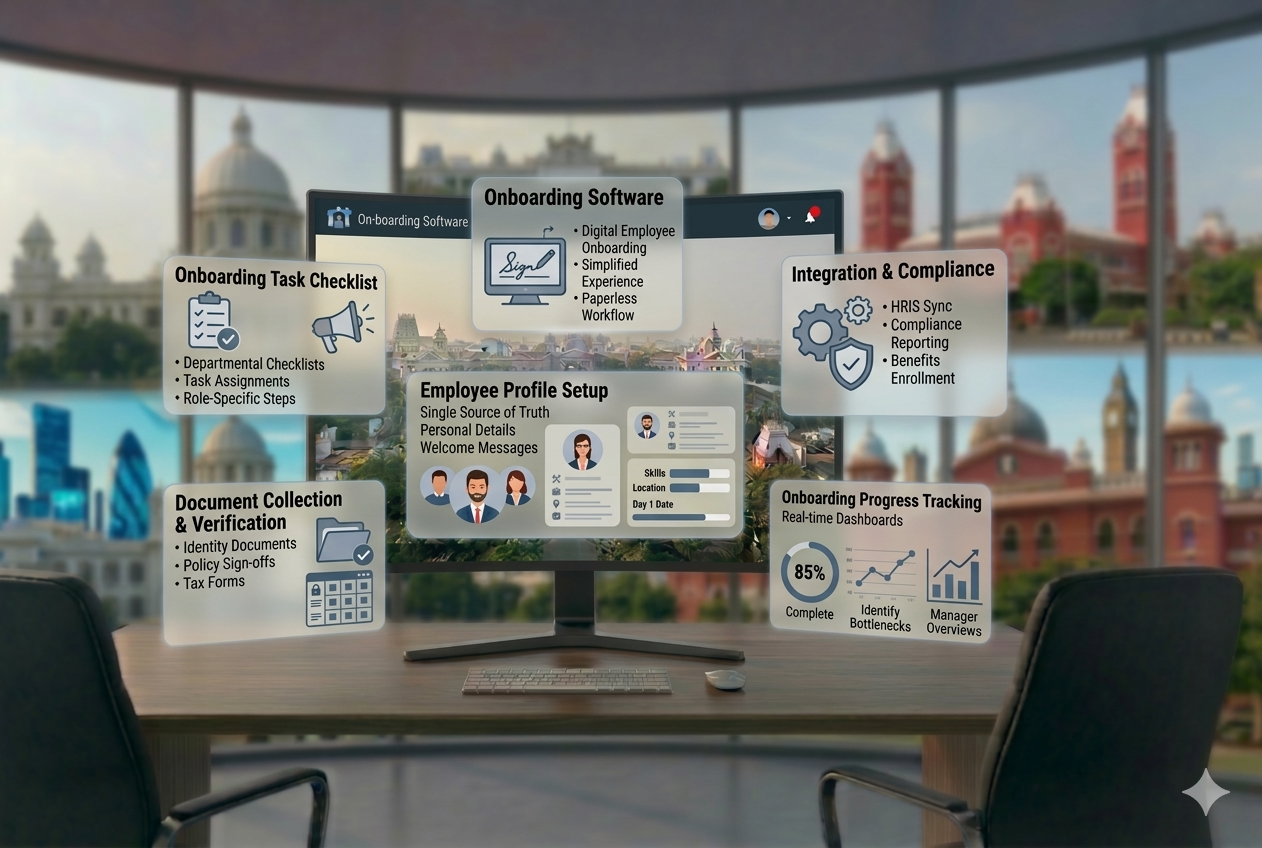
Employee onboarding software is a digital tool that automates and manages the entire process of bringing a new employee into an organisation — from collecting documents and setting up system access to completing compliance forms and assigning first-week tasks. It replaces manual paperwork and ad-hoc email chains with a structured, automated onboarding workflow that HR teams can configure, track, and report on.
Within a broader HRMS, employee onboarding software acts as the entry point for every new hire. The data collected during onboarding — personal details, documents, role information, department — automatically flows into payroll, attendance, leave, and other HR modules, eliminating the need for duplicate data entry.
In the Indian business environment, this is especially critical. New employees are required to submit documents such as PAN cards, Aadhaar, educational certificates, previous employment details, and statutory compliance forms (like Form 11 for EPF). Onboarding software handles all of this digitally, ensuring nothing is missed and records are maintained accurately.
Why Businesses Need Employee Onboarding Software
Manual onboarding is slow, error-prone, and creates a poor first impression. Here is why businesses — from 20-person startups to 500-employee SMEs — are moving to digital onboarding:
Improving Employee Experience
A new hire’s first interaction sets the tone for their entire tenure. A smooth, professional digital onboarding process shows that your organisation is organised and values their time.
Reducing Manual Work for HR
HR teams spend hours chasing documents, filling in spreadsheets, sending reminder emails, and manually creating employee records. Onboarding software automates all of this.
Faster Time-to-Productivity
With structured onboarding workflows, new employees get access to tools, systems, and information faster — reducing the time it takes them to contribute effectively.
Reducing Errors and Compliance Risks
Manual document collection leads to missing records, wrong information, and compliance gaps. Digital onboarding with validation rules ensures data accuracy and statutory compliance.
Standardising the Process
Without software, onboarding quality varies by HR person and department. Software enforces a consistent, repeatable process every time — regardless of who handles the hiring.
Scalability
As your company grows, onboarding 10 people per month versus 2 becomes manageable only with automation. Software scales with you without increasing HR workload proportionally.
How Employee Onboarding Software Works
Here is the complete digital onboarding flow — from offer acceptance to the employee being fully set up in your HR system:
Offer Acceptance
The new hire accepts the offer digitally. Their basic details are captured and an employee profile is created automatically in the system.
Pre-Boarding Document Collection
The employee receives a digital onboarding link and is prompted to upload required documents: PAN card, Aadhaar, educational certificates, previous employment records, bank details, and statutory forms.
Employee Data Entry
Data submitted by the employee is auto-populated into the HR system, eliminating manual data entry by HR teams. Validation checks flag missing or incorrect information immediately.
Task Assignment
Onboarding checklists are automatically assigned to the new hire, their manager, IT, admin, and relevant departments — with deadlines and reminders built in.
Onboarding Workflows
The system guides the employee through company policies, role-specific training materials, compliance acknowledgements, and welcome information — all in a structured, trackable sequence.
System Access Setup
IT access requests are triggered automatically based on the employee’s role and department, ensuring tools and software are ready before day one.
First-Day Onboarding
On joining day, the employee arrives with all paperwork done, access set up, and their manager notified. HR focuses on engagement, not admin.
Tracking and Reporting
HR can view real-time onboarding status for every new hire: tasks completed, documents pending, steps overdue — all from a single dashboard.
Key Features Checklist
Not all employee onboarding systems are built the same. Here are the features that matter:
| Feature | What It Does | Why It Matters |
|---|---|---|
| Digital Document Management | Collect, store, and verify employee documents online | Eliminates physical paperwork and reduces document loss |
| Workflow Automation | Automate task sequences and reminders for HR, IT, and managers | Ensures nothing falls through the cracks |
| Task Tracking | Assign and monitor completion of onboarding tasks across teams | Full visibility into onboarding progress |
| Employee Self-Service | New hires complete their own profile, upload documents, review policies | Saves HR time and empowers employees |
| Document Verification | Flag missing or incorrect documents automatically | Ensures compliance and data accuracy |
| E-Signature Support | Sign offer letters, NDAs, and policies digitally | Faster turnaround, no physical signatures needed |
| HRMS Integration | Sync onboarding data directly into payroll, attendance, and leave modules | Eliminates duplicate data entry across systems |
| Onboarding Checklists | Pre-built and customisable checklists for every role and department | Standardises the process for every new hire |
| Reporting and Analytics | Track onboarding completion rates, time-to-onboard, pending tasks | Measure and improve the process over time |
Benefits of Employee Onboarding Software
For Employees
- ✓Smooth, professional first-day experience with everything set up in advance
- ✓Clear, guided process — no confusion about what to do or submit
- ✓Faster access to systems, tools, and information they need to start contributing
- ✓Digital submission of documents from anywhere — before joining day
- ✓Better first impression, leading to higher engagement from day one
For HR Teams & Business
- ✓Dramatically reduced paperwork and manual data entry
- ✓Faster onboarding — reduce time-to-complete from weeks to days
- ✓Better compliance — no missing documents, no missed statutory forms
- ✓Improved retention — structured onboarding reduces early attrition
- ✓Real-time visibility into onboarding status without chasing emails
- ✓Seamless data flow into payroll, attendance, and other HRMS modules
Onboarding Software vs Manual Onboarding
| Parameter | Manual Onboarding | Onboarding Software |
|---|---|---|
| Speed | Days to weeks for full setup | Hours to 1–2 days |
| Accuracy | Prone to data entry errors and missing documents | Validated data with auto-checks |
| Employee Experience | Confusing, inconsistent, often frustrating | Smooth, guided, professional |
| Document Handling | Physical files, email attachments, scattered folders | Centralised digital repository |
| Scalability | HR workload grows with every new hire | Handles 10 or 100 hires with the same effort |
| Compliance | Easy to miss statutory forms and records | Automated compliance checks |
| Tracking | Manual follow-up calls and emails | Real-time dashboard with status updates |
| Integration | Separate data entry in every HR tool | Single data entry, syncs everywhere |
Who Should Use Employee Onboarding Software?
Employee onboarding software is not just for large enterprises. It is particularly valuable for:
SMEs (Small & Medium Enterprises)
Companies hiring 5 to 200 employees often have small HR teams managing large volumes of manual work. Onboarding software gives them enterprise-grade process without the overhead.
Startups
Fast-growing startups hire quickly and need consistent onboarding from day one. Software prevents the chaos of ad-hoc processes as the team scales.
Growing & Multi-Location Companies
Companies expanding into new cities or departments need a standardised onboarding process that works consistently across locations.
High-Volume or Seasonal Hiring
Businesses with high turnover or seasonal hiring — retail, hospitality, manufacturing, field sales — benefit massively from automated, repeatable onboarding workflows.
Teams Replacing Manual Processes
If your HR team is still collecting documents via email and entering data into spreadsheets, onboarding software is the single highest-impact HR investment you can make.
Common Onboarding Problems Without Software
If you are still onboarding manually, these are the challenges your HR team faces regularly:
Delayed Onboarding
Physical document collection, back-and-forth emails, and manual data entry mean new hires wait days — sometimes weeks — before they are fully set up and productive.
Document Errors and Missing Records
Without a structured collection process, employees frequently submit incorrect or incomplete documents. In India, missing PAN, Aadhaar, or Form 11 creates statutory compliance risks with EPFO and income tax authorities.
Poor Employee Experience
A new hire who spends their first week chasing HR for access, submitting documents multiple times, or waiting for their profile to be created will quickly disengage — directly impacting retention.
No Visibility or Tracking
HR managers have no real-time view of who has completed what. Status updates require manual follow-up across multiple people — creating delays and gaps.
High HR Workload
HR teams spend disproportionate time on admin — data entry, document filing, email reminders — instead of focusing on employee engagement and strategic tasks.
Inconsistent Process
Different HR team members onboard employees differently. There is no standardised experience — leading to gaps, missed steps, and an uneven first impression of the organisation.
How to Choose the Right Employee Onboarding Software
With multiple options available, here is a practical decision guide for HR managers and business owners:
Ease of Use
The software must be simple enough for both HR teams and new employees to navigate without training. Complex systems create adoption problems and defeat the purpose.
Automation Features
Look for automated task assignment, reminder workflows, document checklists, and notification systems. The more you can automate, the less manual work remains.
Integration with HRMS
Onboarding data should flow directly into payroll, attendance, and leave modules. A standalone tool that does not integrate creates duplicate data entry — which is exactly the problem you are trying to solve.
Document Handling Capability
For the Indian context, ensure the system supports collection and verification of PAN, Aadhaar, Form 11, educational certificates, and previous employment records.
Scalability
Choose a system that can handle your current hiring volume and grow with you. Pricing should scale reasonably as headcount increases.
Mobile Accessibility
New hires should be able to complete their onboarding from a mobile device. This is especially relevant in India, where mobile-first internet usage is dominant.
Support and Implementation
Especially for SMEs, responsive support during setup and ongoing use is critical. Look for vendors with onboarding assistance and local support teams.
How Onboarding Software Connects with Your HRMS
Onboarding is not a standalone event — it is the starting point of the entire employee HR lifecycle. When your onboarding software is integrated with your HRMS, data entered once flows automatically into every connected module:
→ Employee Database
The employee profile created during onboarding becomes the master record — name, department, role, joining date, compensation band — powering all other modules.
→ Payroll Setup
Bank account details, PAN, salary structure, and statutory deductions collected during onboarding push directly to payroll. No re-entry required. See: Payroll Management System
→ Attendance Integration
The employee is automatically added to attendance tracking from their joining date. Shift, work location, and work mode are configured during onboarding. See: Attendance Management System
→ Leave System
Leave policy assignment, balance calculation, and entitlement setup begin automatically on the joining date. See: Leave Management System
→ Employee Self-Service Portal
The new hire’s ESS login is created as part of onboarding, giving them access to payslips, leave requests, and personal record management from day one. See: Employee Self-Service Portal
The integrated advantage: When onboarding software is part of a complete HRMS, you eliminate data silos entirely. One source of truth. No duplicate entry. No reconciliation errors. The employee’s data is live across payroll, attendance, leave, and HR reports from their very first day.
Related Resources
- → Cloud-Based HRMS: Complete Guide
- → Payroll Management System: Complete Guide
- → Attendance Management System: Complete Guide
- → Employee Self-Service Portal: Complete Guide
- → HR Software Chennai — Overview
How to Implement Employee Onboarding Software
Switching from manual to digital onboarding does not have to be complicated. Follow this practical implementation path:
Review Your Current Onboarding Process
List every step in your existing onboarding: what documents you collect, which teams are involved, how long each step takes, and where delays most often occur.
Define Your Onboarding Workflow
Map the ideal onboarding journey: pre-boarding, joining day, first week, first month milestones. Include all stakeholders — HR, IT, admin, and the hiring manager.
Choose the Right Software
Evaluate options based on HRMS integration, document handling, ease of use, and scalability for your team size.
Configure Onboarding Steps
Set up document checklists, task assignments, automated reminders, and welcome communications. Customise workflows for different departments or roles if needed.
Train the HR Team
Run a short training session so the HR team is comfortable using the system before the first hire goes through it. Most modern onboarding tools have minimal learning curves.
Go Live and Iterate
Onboard your first batch through the new system. Gather feedback, track completion rates, and refine the workflow based on real usage data before scaling to all hiring.
Real Business Use Cases
A 40-person SaaS startup was onboarding new engineers via WhatsApp messages and email attachments. Documents were collected inconsistently, and payroll setup frequently happened weeks after the joining date. After implementing onboarding software integrated with their HRMS, the entire process — from offer acceptance to active payroll — was reduced to 2 days. HR time spent on onboarding admin dropped by over 60%.
A 180-person retail chain was hiring store staff across 12 locations. Each store manager handled onboarding differently, leading to missing statutory documents and inconsistent employee records. With a centralised onboarding system, all new hires — regardless of location — followed the same digital onboarding journey. Compliance document completion reached 100%, and HR could track onboarding status across all locations from a single dashboard.
A mid-sized manufacturing company was experiencing 28% first-year attrition. Exit interviews consistently cited a poor onboarding experience as a contributing factor. After implementing structured onboarding workflows — including automated welcome messages, role-specific task assignments, and manager check-in reminders — employee satisfaction in the first 30 days improved measurably, and first-year attrition dropped significantly within two hiring cycles.
Final Thoughts
Employee onboarding software is no longer a luxury reserved for large enterprises. In 2026, it is a foundational HR tool for any business that wants to hire well and retain talent.
The cost of poor onboarding is real: early attrition, disengaged employees, compliance gaps, and overworked HR teams. The cost of good onboarding software — and the time it saves — pays itself back within the first hiring cycle.
More importantly, onboarding is the first chapter of the employee experience. How you bring someone into your organisation directly shapes how they perform, how long they stay, and how they talk about you as an employer.
Whether you are a 20-person startup or a 500-person SME, the right employee onboarding system — especially one integrated with a complete HRMS — gives your HR team the structure, automation, and visibility to onboard every employee the right way, every time.
Ready to Transform Your Onboarding Process?
See how digital onboarding integrated with a complete HRMS can take your new hires from offer acceptance to day one in hours — not days.