Online Attendance Guide
2026
Online Attendance Management System: Complete Guide (2026)
Quick Answer
What is an online attendance management system?
An online attendance management system is a cloud-based or web/mobile platform that tracks employee attendance without requiring on-premise hardware. Employees clock in via browser, mobile app, or GPS location; managers see real-time attendance data; and the system syncs directly to payroll â making it ideal for remote, hybrid, and field teams.
How cloud-based attendance tracking works for remote teams, field workforces, and multi-location businesses — and how to connect it to payroll without manual reconciliation.
Key Takeaways
-
✓
An online attendance management system captures attendance through web, mobile, or GPS — from anywhere, in real time, without physical device dependency. -
✓
Unlike biometric-only systems, online attendance works for remote employees, field teams, multi-location businesses, and hybrid workforces. -
✓
When integrated with payroll, online attendance eliminates manual LOP calculation, overtime reconciliation, and data export — reducing payroll processing time significantly. -
✓
Indian businesses with field teams, distributed offices, or remote workers gain the most immediate value from switching to a cloud-based attendance system. -
✓
Most online attendance systems can be deployed in 1–2 weeks and require no hardware investment beyond employees’ existing smartphones.

Every HR team has a version of the same story. Attendance is collected through a biometric machine at the office door. An employee works from home — no entry. A field executive marks attendance on paper — no visibility. Month-end arrives, and the payroll team spends two days manually reconciling who was present, who was on leave, and who worked overtime. Then someone discovers the biometric export file does not match the leave records.
This is not an edge case. It is the daily reality for thousands of Indian businesses managing workforces that are no longer confined to one office, one shift, or one device.
An online attendance management system solves this at the root. Instead of relying on a single physical device or a manual register, it captures attendance through any internet-connected method — a mobile app, a web browser, GPS check-in, or a biometric integration — and syncs it in real time to a central system connected to payroll and leave management.
What Is an Online Attendance Management System?
Quick Answer
An online attendance management system is cloud-based software that tracks employee attendance through web browsers, mobile apps, or GPS — in real time — and integrates with leave management and payroll to eliminate manual reconciliation.
Traditional attendance management relies on physical infrastructure: biometric machines, punch cards, or paper registers. These work only in one location and for employees who are physically present. An online attendance management system removes that constraint entirely.
Employees can check in from a browser, a mobile app, or a GPS-enabled device. Managers see real-time attendance status from any location. HR teams access consolidated reports without waiting for end-of-day exports. And payroll teams receive accurate, reconciled data automatically — without manual intervention.
For Indian businesses managing a mix of office, remote, and field employees — or operating across multiple locations with different shifts — an online system is not just a convenience. It is a functional necessity.
Why Businesses Need an Online Attendance Management System
Remote and Field Employees Cannot Use a Biometric Machine
A biometric device at the office entrance solves attendance for 60% of your workforce at best. Remote employees, field executives, delivery teams, and traveling managers have no physical device to use. Online attendance systems give every employee a method to mark attendance — from wherever they are working.
Manual Reconciliation Creates Payroll Errors
When attendance data comes from multiple sources — biometric exports, WhatsApp messages, paper registers — HR teams spend days reconciling it before processing payroll. Errors in this reconciliation directly affect salary calculations, loss-of-pay deductions, and overtime payments.
Real-Time Visibility Changes How HR Operates
With a manual or biometric-only system, HR knows who was present yesterday — only after exporting and reviewing data. An online attendance management system shows who is present right now, across all locations, in a live dashboard. This changes how HR handles absenteeism, shift coverage, and workforce planning.
Biometric Systems Are Single Points of Failure
A biometric machine that malfunctions, loses power, or has a connectivity issue means an entire day’s attendance is lost or disputed. Online systems capture attendance through multiple channels — app, web, GPS — providing redundancy that a standalone device cannot.
How an Online Attendance Management System Works (Step-by-Step)
Step 1
Employee Login
The employee accesses the attendance system through a mobile app or web browser using their unique credentials. No device dependency, no queue at the biometric machine.
Step 2
Online Check-In / Check-Out
The employee marks their attendance at the start and end of their shift. The system records the exact timestamp and, if configured, the GPS location at the moment of check-in.
Step 3
GPS / Location Tracking
For field employees or remote workers, the system captures the employee’s location at check-in, verifying that they are at the correct site or within an approved geo-fence boundary.
Step 4
Shift and Policy Mapping
The system applies the employee’s configured shift schedule, grace period, late-arrival rules, and overtime policy automatically — no manual interpretation needed.
Step 5
Real-Time Data Sync
Attendance data syncs to the central system instantly. HR managers see live attendance status across all employees and locations without waiting for end-of-day exports.
Step 6
Leave and Overtime Integration
Approved leaves automatically adjust payable days. Overtime hours are calculated against shift schedules and flagged for approval or auto-processing based on configured rules.
Step 7
Payroll Sync
At payroll processing time, attendance data — present days, LOP, overtime — flows directly into the payroll module, eliminating manual data entry and reconciliation entirely.
Types of Online Attendance Systems
| Type | How It Works | Best For |
|---|---|---|
| Web-Based Attendance | Employees check in via browser on any device connected to the internet. | Office teams, remote workers on laptops |
| Mobile App-Based | Check-in through a smartphone app with timestamp and optional selfie verification. | All employees, especially non-desk workers |
| GPS-Based Attendance | Location is captured at check-in to verify the employee is at the right place. | Field executives, delivery teams, site staff |
| Cloud-Based System | All attendance data stored and processed on cloud servers, accessible from anywhere. | Multi-location and distributed teams |
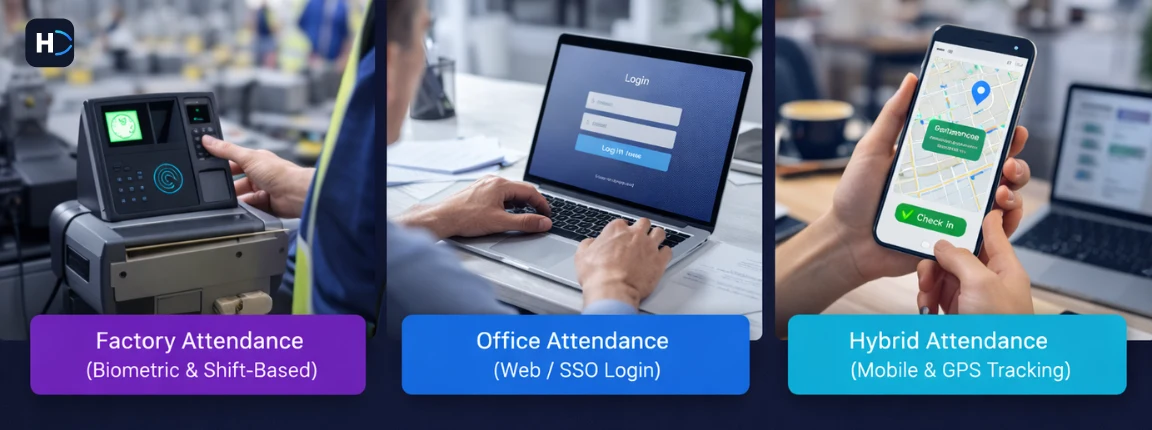
| Hybrid (Biometric + Online) | Biometric for office, app/web for remote and field — all feeding one central system. | Companies with mixed workforce types |
Key Features Checklist: What Your Online Attendance System Must Have
Benefits of an Online Attendance Management System
For Employees
- Easy Check-In / Check-Out: One tap on the mobile app or a quick web login marks attendance. No queues at biometric machines, no paper registers.
- Flexibility: Remote workers, field employees, and travelling team members can mark attendance from anywhere with an internet connection.
- Transparency: Employees can see their own attendance history, present days, leave balance, and overtime records in real time — without querying HR.
For HR and Business
- Real-Time Tracking: Live dashboard shows present, absent, and late employees across all locations at any moment.
- Reduced Manual Work: Attendance reconciliation, LOP calculation, and overtime processing that used to take days now happens automatically.
- Accurate Payroll: Payroll calculations are based on validated, system-generated attendance data — not manually consolidated spreadsheets.
- Workforce Visibility: Attendance patterns, absenteeism trends, and shift coverage gaps visible in reports — enabling proactive management.
- Scalability: Whether you have 30 employees or 3,000, the system handles volume growth without adding HR headcount or changing processes.
Online Attendance System vs Biometric / Manual Systems
| Parameter | Biometric / Manual | Online Attendance System |
|---|---|---|
| Remote Access | Not possible — device required | Full access from any device, anywhere |
| Real-Time Data | Available only after export | Live dashboard, updated instantly |
| Field Employee Tracking | Cannot track without device | GPS check-in from mobile app |
| Setup Cost | Hardware investment required | No hardware — subscription-based |
| Maintenance | Device servicing, replacement | Managed by vendor, auto-updated |
| Scalability | One device per location maximum | Unlimited employees across locations |
| Payroll Integration | Manual export and reconciliation | Automatic sync — no manual step |
| Multi-Location Support | Separate devices per location | All locations on one platform |
| Failure Risk | Device malfunction loses data | Cloud redundancy, no data loss |
Who Should Use an Online Attendance Management System?
SMEs with Growing Teams
As headcount grows beyond 30–40, manual attendance becomes unmanageable. An online system scales without adding admin overhead.
Remote and Hybrid Workforces
Teams where employees work from home, co-working spaces, or client sites need an attendance method that is not tied to a physical location.
Field Workforce Companies
Sales teams, delivery executives, site engineers, healthcare workers, and service technicians require GPS-based check-in to verify location alongside attendance.
Multi-Location Businesses
Companies with offices in multiple cities need centralized attendance visibility with location-specific shift policies — exactly what online systems provide.
IT and Service Companies
Software companies with flexible work arrangements and client-facing teams benefit from mobile attendance that accommodates non-standard schedules and remote-first work culture.
Common Problems Without an Online Attendance System
No Real-Time Data
HR and operations teams cannot see who is present right now. Absence coverage decisions are reactive, not proactive. Workforce planning happens on yesterday’s data.
Remote Employee Tracking Gaps
Employees working from home or in the field have no reliable, auditable attendance record. Month-end disputes are common and time-consuming to resolve.
Payroll Delays and Errors
Manual reconciliation of attendance from multiple sources — biometric exports, WhatsApp, paper — creates errors that delay payroll and trigger employee complaints about incorrect salaries.
Attendance Proxy and Manipulation
Physical register systems and even biometric machines are vulnerable to buddy punching and data manipulation. GPS-based online systems with selfie verification significantly reduce this risk.
HR Inefficiency
HR teams spending 2–3 days per month on attendance reconciliation alone represent significant productivity loss that a system should eliminate entirely.
How to Choose the Right Online Attendance System
The right online attendance management system depends on your workforce type, location setup, and payroll integration needs. Evaluate on these criteria:
How Online Attendance Connects with Payroll and HRMS
Attendance data is only as valuable as what you do with it. The real power of an online attendance management system comes from its integration with the broader HR and payroll ecosystem.
Payroll Automation
When attendance integrates with payroll, present days, LOP, and overtime feed directly into salary calculation. The payroll team does not reconcile data — they review and approve an already-accurate calculation.
Leave Sync
When an employee’s leave is approved, the attendance module automatically adjusts payable days without HR needing to update two systems. No leave-attendance mismatch at payroll time.
Compliance Accuracy
Accurate attendance data means accurate LOP deductions, which means accurate gross salary, which means accurate EPF, ESI, and TDS calculations. Errors in attendance cascade into compliance errors.
Centralized HR System
When attendance is part of an integrated HRMS, every HR module — payroll, leave, performance, self-service — works from the same employee data. No data silos, no duplication, no conflicting records.
Standalone attendance tools that require manual data export to payroll are not a solution — they are a different version of the same problem. The goal is a connected system where attendance, leave, and payroll work as one.
See related:
Payroll Software
Attendance Management System Guide
Leave Management System
Online Attendance System Implementation Guide
Implementing an online attendance system is simpler than most businesses expect. Here is a structured approach:
Step 1
Assess Your Current Attendance Method
Document what you use today: biometric, manual register, Excel. List the gaps — remote tracking, field visibility, payroll delays. This becomes your baseline for evaluating improvement.
Step 2
Define Attendance Policies
Confirm your shift timings, grace period, overtime rules, late arrival policy, and holiday calendar before configuration. The system will enforce what you define — get these right first.
Step 3
Select the System
Demo 2–3 options with your real scenarios: field check-in, shift change, LOP payroll sync. Do not evaluate on feature lists alone — test what your employees will actually use daily.
Step 4
Configure Settings
Set up shifts, locations, geo-fence boundaries, overtime rules, and leave policies in the system. Get vendor support for initial configuration — do not skip this step.
Step 5
Onboard Employees
Distribute login credentials and a simple check-in guide. For mobile app users, a 5-minute video walkthrough is usually sufficient. Keep adoption friction as low as possible.
Step 6
Train HR and Managers
HR needs to understand the reporting module and payroll sync. Managers need to know how to approve attendance corrections and view team reports through the manager dashboard.
Step 7
Monitor and Adjust
Review the first month’s reports. Check for GPS accuracy, shift mapping errors, and leave sync issues. Adjust policies before the first automated payroll run to ensure clean data.
Real Business Use Cases
SME with 45 Office Employees — Vadodara-Based Manufacturing Firm
Challenge: A manufacturing company with 45 office staff was using a single biometric machine that frequently had connectivity issues, resulting in missed punches and attendance disputes every month. HR was spending 3 days reconciling attendance before payroll.
Result: After implementing a cloud attendance system with mobile backup check-in, missed punches disappeared, attendance data synced directly to payroll, and processing time dropped to 4 hours.
Field Workforce Company — 80 Sales Executives Across Gujarat
Challenge: A FMCG distributor with 80 field sales executives had no verifiable attendance record. Field staff marked attendance via WhatsApp messages, which HR manually consolidated each month.
Result: After deploying GPS-based online attendance with geo-fence check-in at distributor locations, the company gained real-time visibility into field staff presence and cut HR reconciliation time from 4 days to half a day per month.
Remote-First IT Team — 35 Employees Across 6 Cities
Challenge: A software consultancy with 35 remote employees spread across Ahmedabad, Pune, Bengaluru, Hyderabad, Mumbai, and Rajkot had no structured attendance system. Attendance was self-reported and unverified.
Result: After implementing a web-based attendance system with manager approval workflows, the company established a consistent attendance record connected to their payroll module, with employees having self-service access to their own attendance history.
Final Thoughts
The workforce has changed. Employees work from home, from client sites, from co-working spaces, and across cities. Biometric machines and paper registers were built for a world where every employee walked through the same door every morning. That world no longer exists for most businesses.
An online attendance management system is not just a technology upgrade — it is an operational alignment with how work actually happens today. It gives HR teams real-time visibility, gives employees flexibility and transparency, and gives payroll teams accurate data without manual reconciliation.
For Indian SMEs managing growing, distributed workforces, the cost of not having an online attendance system shows up every month: in payroll errors, compliance miscalculations, employee disputes, and HR time spent on tasks that a system should handle automatically.
Making the switch is simpler than most businesses expect. The complexity is in the manual process you are already running — not in the system that replaces it.
See related:
Attendance Management System Guide
Payroll Software
Leave Management System
HRMS Software India
See Attendance Software
Frequently Asked Questions
What is an online attendance management system?
An online attendance management system is cloud-based software that tracks employee attendance through web browsers, mobile apps, or GPS check-in — in real time — without requiring a physical device at a fixed location.
How is it different from a biometric attendance system?
Biometric systems require employees to be physically present at a specific device. Online systems work from any internet-connected device — mobile, tablet, or laptop — making them suitable for remote employees, field teams, and multi-location businesses.
Can an online attendance system track remote employees?
Yes. Employees working from home or remote locations mark attendance through a mobile app or web browser. GPS tracking can verify location at check-in for field employees or roles where location verification is required.
Does it integrate with payroll?
Yes — and this is one of its most important features. When integrated with payroll, attendance data (present days, LOP, overtime) flows directly into salary calculation, eliminating manual data export and reconciliation.
Is online attendance suitable for small businesses?
Absolutely. Online attendance systems are subscription-based, require no hardware, and can be implemented in days. For small businesses with even one remote employee or a field team, they provide immediate value over manual methods.
Is GPS tracking mandatory?
No. GPS tracking is optional and typically used for field teams, delivery staff, or roles where location verification is required. Office-based or remote office employees can use app or web check-in without GPS.
What happens if an employee forgets to check in?
Most systems allow HR or managers to manually correct attendance for missed check-ins, with an approval workflow that creates an audit trail. Some systems also allow retroactive check-in by employees, subject to manager approval.
Can it handle multiple shifts and locations?
Yes. Online attendance systems support multi-shift configuration (day, night, rotational), different shift schedules per department, and location-specific holiday calendars — all managed within one platform.
Online Attendance for Remote & Hybrid Teams in Chennai
Post-pandemic, Chennai’s IT corridor (OMR, Sholinganallur, Perungudi) has embraced hybrid work permanently. Online attendance management systems handle this without biometric hardware â employees clock in from anywhere on mobile or web, GPS confirms location, and HR gets real-time visibility across Chennai, Bengaluru, and Mumbai teams in one dashboard. Field teams in Tamil Nadu using GPS-based attendance have cut manual reconciliation from 3 days to 30 minutes per payroll cycle.