Skip to content
← Back to Guide
Guide

Online Attendance Management System: Complete Guide 2026

Published April 2026 37 min read
Online Attendance Management System: Complete Guide 2026
Quick Answer

An Online Attendance Management System enables real-time attendance tracking via web or mobile from any location, supporting remote and hybrid teams while integrating automatically with payroll processing.

Why Businesses Are Switching from Manual to Online Attendance Systems

Many businesses do not realize how much time and money they lose because of manual attendance tracking until payroll gets delayed, attendance disputes increase, or managers lose visibility across teams. Registers, Excel sheets, punch data mismatches, and manual corrections may work for a small team for some time, but they quickly become inefficient as the business grows.

For Chennai and Tamil Nadu businesses managing office teams, field employees, shift workers, or multi-location operations, manual attendance tracking creates friction at every level. HR teams spend hours reconciling data. Managers lack real-time visibility. Employees dispute records. Payroll processing gets delayed. And as the workforce grows, the problem compounds.

This guide is for decision-makers evaluating whether it is time to move away from manual tracking. It explains why businesses are shifting to online attendance systems, what problems these systems solve, and how the transition improves accuracy, payroll sync, and workforce visibility.

Key Takeaways

  • Manual attendance tracking often leads to errors, delays, and poor visibility.
  • Online attendance systems give businesses real-time access to employee attendance data.
  • Attendance software improves payroll accuracy by connecting attendance, leave, shifts, and overtime.
  • Businesses with remote, field, hybrid, or multi-location teams benefit more from online systems.
  • Online attendance systems reduce HR workload and improve employee transparency.
  • Chennai and Tamil Nadu businesses with shift-based or growing teams often need a more scalable approach than manual tracking.
  • An integrated attendance system works better when connected with payroll and HR software.

What Is an Online Attendance Management System?

An online attendance management system is a digital platform used to track employee attendance through web, mobile apps, biometric integration, or cloud-based workflows. It records clock-in and clock-out times, tracks work hours, shifts, overtime and breaks, and syncs the data automatically to payroll and leave modules.

Unlike manual methods that rely on registers, spreadsheets, or disconnected punch records, online attendance systems centralize attendance data in real time. Employees mark attendance from their location. Managers approve regularization requests. HR teams access attendance reports instantly. And payroll processing pulls clean, policy-ready data without manual intervention.

For businesses in Chennai and Tamil Nadu managing distributed teams, shift workers, or multi-branch operations, this shift from manual to digital attendance tracking is not a luxury. It is a practical response to operational friction.

How It Differs from Manual Attendance Tracking

The fundamental difference between manual and online attendance tracking is how data moves through the system.

Manual attendance tracking requires human intervention at every step. Employees sign registers or send attendance updates via email or WhatsApp. Supervisors consolidate the records. HR teams enter the data into Excel or another tracking tool. Month-end reconciliation involves cross-checking multiple sources, correcting errors, and manually calculating overtime, late marks, and leave adjustments before sending the data to payroll.

Online attendance systems automate most of this workflow. Attendance is captured digitally through mobile apps, biometric devices, web portals, or GPS-based check-ins. The system applies attendance policies automatically. Managers approve regularization requests through the same platform. And attendance data flows directly into payroll without manual re-entry.

The result is faster processing, fewer errors, better audit trails, and real-time visibility for everyone involved.

Where It Fits in HR Operations

Attendance is not isolated. It connects directly to multiple HR functions:

  • Attendance tracking — Records employee work hours, late arrivals, early departures, and absences.
  • Leave management — Integrates leave balances with attendance to determine payable days.
  • Shift and roster management — Tracks shift changes, swap requests, and ensures adequate coverage.
  • Overtime calculation — Captures extra hours worked and applies overtime policies.
  • Payroll processing — Supplies clean attendance data for accurate salary calculation.
  • Employee self-service — Allows employees to view their attendance, apply for regularization, and check overtime balances.

An online attendance management system sits at the center of this workflow. When attendance is accurate and accessible, the rest of HR operations run more smoothly.

Why Businesses Are Moving Away from Manual Attendance Tracking

Manual attendance tracking creates operational friction that grows with the business. What works for a 10-person team becomes a bottleneck at 50 employees. What is manageable with one location becomes chaotic with three branches. And what seems like a minor inconvenience each month becomes a major cost when payroll delays, attendance disputes, and HR workload compound over time.

Manual Attendance Takes Too Much Time

Manual attendance tracking consumes more HR time than most businesses realize.

Daily record updates require someone to collect punch-in data from registers, emails, or messaging apps. Approvals and corrections happen outside the system—employees email HR to report a missed punch, HR updates the record manually, and the supervisor is informed separately. Repeated HR follow-ups are common because managers do not submit attendance on time or because employees forget to regularize their records.

Month-end reconciliation is where the real time drain happens. HR teams cross-check attendance records against leave balances, shift schedules, and payroll requirements. They identify discrepancies. They reach out to employees and managers for clarifications. They correct errors. They manually calculate overtime and late-mark deductions. And only after this cleanup process is attendance data ready for payroll.

For Chennai businesses with shift-based teams or field employees, this process is even more complex. Multiple shifts mean multiple attendance rules. Field employees report in and out at different times. And multi-location teams require consolidated tracking across sites. All of this takes time. And time is cost.

Errors Increase as the Team Grows

Manual attendance tracking is error-prone by design. Wrong entries happen because someone transcribes the data incorrectly or applies the wrong attendance rule. Missing records occur when employees forget to mark attendance or when punch data is not captured properly. Duplicate corrections happen when HR updates the same record multiple times based on conflicting information. And mismatches between actual attendance and final payroll create disputes that take even more time to resolve.

At 10 employees, these errors are manageable. At 50 employees, they become a monthly problem. At 100 or more employees, they affect payroll accuracy, employee trust, and HR efficiency. The issue is not carelessness. The issue is that manual systems depend on human intervention at every step. And every manual step is an opportunity for error.

Managers Lack Real-Time Visibility

Manual attendance systems do not give managers real-time visibility into who is present, absent, late, or working remotely. For businesses with multiple teams, field employees, or multi-location operations, lack of visibility creates real operational challenges.

Managers do not know if enough staff are present to cover a shift. They cannot quickly identify attendance trends or chronic absenteeism. They have no way to track remote or field employees without relying on manual check-ins. Chennai and Tamil Nadu businesses managing retail outlets, factory shifts, or distributed sales teams face this problem regularly. Without real-time attendance visibility, managers operate with incomplete information.

Manual Systems Do Not Scale Well

Excel and registers may work at 10 employees. They become risky at 50. And they break down entirely at 100 or more. Scaling a manual attendance system means adding more people to manage the same workflow. More employees to collect punch data. More supervisors to approve corrections. More HR time to reconcile records. The system does not get more efficient as the business grows—it gets slower and more complex.

This is why businesses outgrow manual attendance tracking. Not because the system stops working entirely, but because it stops scaling with the business.

Common Problems Businesses Face with Manual Attendance Systems

Manual attendance tracking creates specific, recurring problems that affect payroll, HR efficiency, and employee trust. These problems are not occasional exceptions. They are predictable outcomes of manual workflows.

Payroll Delays

Payroll processing depends on clean attendance data. Manual attendance systems rarely deliver that. Attendance data needs manual cleanup before salary processing. Leave balances need to be reconciled. Late marks and overtime need to be verified. And if the data is not ready by the payroll cutoff date, salary processing gets delayed.

For employees, payroll delays damage trust. For HR teams, last-minute attendance corrections create stress. And for businesses, delayed payroll affects operations, compliance, and employee satisfaction. This problem is especially common in Chennai businesses with shift workers, where attendance rules vary by shift and overtime calculations are more complex.

Attendance Disputes

Attendance disputes happen when employees disagree with their recorded attendance—present days, late marks, overtime hours, or leave deductions. In a manual system, there is often no clear record of what actually happened. The register might say the employee was absent. The employee insists they were present. The supervisor does not remember. And HR spends time investigating a dispute that could have been avoided with a timestamped, location-tagged digital record.

Lack of record transparency makes these disputes harder to resolve. Employees cannot see their own attendance data. Managers cannot pull up historical records quickly. And HR becomes the arbiter of conflicting claims without enough evidence. Online attendance systems solve this by creating an audit trail. Every punch is timestamped. Location data is captured. And employees can see their own records in real time.

Buddy Punching and Time Manipulation

Buddy punching happens when one employee marks attendance on behalf of another employee who is absent. Time manipulation happens when employees adjust their punch times to avoid late marks or claim unearned overtime. Manual attendance systems—especially paper registers or unsupervised Excel entries—are vulnerable to both.

Proxy marking is easy when there is no verification mechanism. Missed punch handling becomes a loophole when employees can claim they forgot to punch and HR adds the entry manually without proof. For businesses managing field teams, retail outlets, or factory shifts, buddy punching and time theft can cost 2 to 3 percent of payroll annually. That is a direct loss that could be eliminated with geo-fencing, selfie verification, or biometric attendance.

Shift and Overtime Mismanagement

Manual shift tracking is error-prone because shift schedules, swap requests, and overtime rules are managed separately from attendance records. Shift changes are communicated via WhatsApp or email. Attendance is recorded in a register or Excel. Overtime is calculated manually at month-end. And when these systems do not talk to each other, errors compound.

Overtime often gets miscalculated because HR does not have real-time data on how many extra hours each employee worked. Shift coverage issues arise because managers do not have visibility into who is scheduled for which shift. For Chennai and Tamil Nadu businesses with multi-shift operations—factories, retail, logistics, security services—this is a monthly headache.

HR Team Overload

Manual attendance tracking overloads HR teams with routine, low-value work that could be automated. HR spends time collecting punch data, following up with managers, correcting errors, resolving disputes, and manually preparing attendance reports. All of this work is necessary in a manual system, but it is not strategic. It does not improve hiring, employee engagement, performance management, or retention. The real cost is opportunity cost. HR teams stuck in manual attendance workflows have less time for work that actually moves the business forward.

Why Online Attendance Systems Are Becoming the Preferred Choice

Businesses are shifting to online attendance systems because these systems solve the specific problems manual tracking creates. The shift is not about technology for its own sake. It is about accuracy, speed, visibility, and scalability.

Real-Time Attendance Tracking

Online attendance systems provide instant visibility into who is present, absent, on leave, or working remotely. Managers can see live attendance status from a dashboard. HR teams can track attendance trends in real time. And executives can monitor workforce utilization across locations without waiting for end-of-month reports.

This real-time access supports quicker managerial control. If attendance is low on a critical shift, managers can respond immediately. If absenteeism spikes in a particular team, HR can investigate the cause. And if field employees are not checking in as expected, supervisors can follow up before the issue affects operations.

Better Accuracy

Online attendance systems reduce errors by removing manual data entry and applying attendance policies automatically. Fewer manual entries mean fewer transcription mistakes. Fewer corrections mean less rework. And policy-based calculations—grace periods, half-day rules, overtime thresholds—are applied consistently across all employees. The result is cleaner data, fewer disputes, and less HR time spent fixing errors. Accuracy matters most in payroll. When attendance data is wrong, salaries are wrong. And when salaries are wrong, employee trust is damaged.

Easy Integration with Payroll

Attendance flows directly into payroll in an integrated system. No manual export. No re-entry. No reconciliation between attendance records and payroll inputs. This integration eliminates a major source of payroll errors, speeds up payroll processing, and reduces the risk of salary disputes caused by attendance data mismatches. For Chennai and Tamil Nadu businesses running monthly payroll cycles, this integration saves 10 to 15 hours of HR time per month. That time can be redirected to hiring, training, compliance, or employee engagement.

Better Experience for Employees

Employees benefit from online attendance systems because they gain visibility and control over their own records. They can check their attendance at any time. They can see how many days they worked, how many leaves they have taken, and whether any late marks or early departures were recorded. They can apply for attendance regularization directly through the system instead of emailing HR. This transparency reduces confusion. Employees trust the system more when they can see the same data HR sees. And disputes decrease because employees can identify and resolve discrepancies early instead of discovering them at month-end.

Support for Modern Work Models

Online attendance systems are built for remote teams, hybrid teams, field employees, and branch-based teams—work models that manual attendance tracking struggles to handle. Remote teams can mark attendance through mobile apps or web portals. Hybrid teams can use different attendance methods depending on where they are working. Field employees can check in from customer sites with location-tagged punches. For businesses in Chennai and Tamil Nadu managing sales teams, service engineers, delivery staff, or multi-branch retail operations, this flexibility is essential.

Manual Attendance vs Online Attendance System

The table below compares manual and online attendance tracking across key factors that affect HR efficiency, payroll accuracy, and employee experience.

Factor Manual Method Online System
Data Entry HR enters attendance manually from registers, emails, or spreadsheets Employees mark attendance digitally; data is captured automatically
Accuracy High risk of errors due to manual entry and transcription Policy-based automation reduces errors significantly
Visibility Limited; attendance data sits in files or spreadsheets Real-time dashboard access for HR, managers, and employees
Payroll Integration Manual export and re-entry into payroll system Attendance flows directly into payroll without manual steps
Remote Tracking Difficult; requires manual check-ins or emails GPS, selfie, or web-based check-ins with location tracking
Reporting Manual report generation; time-consuming Automated reports; instant access to summaries and trends
Scalability Does not scale well; requires more people as team grows Scales easily; same system works for 10 or 1,000 employees
Employee Access Employees cannot see their own attendance records Employees access records anytime via mobile app or web portal
Audit Readiness Poor; manual records are hard to verify Strong; timestamped, location-tagged digital audit trail

This comparison shows why businesses outgrow manual attendance tracking. The limitations that seem minor at 10 employees become major operational problems at 50 or 100.

How an Online Attendance Management System Works

Online attendance systems follow a simple workflow: capture attendance, apply policies, route approvals, sync with payroll and leave, and generate reports. Understanding this workflow helps businesses evaluate which features matter most for their operations.

Employee Check-In Methods

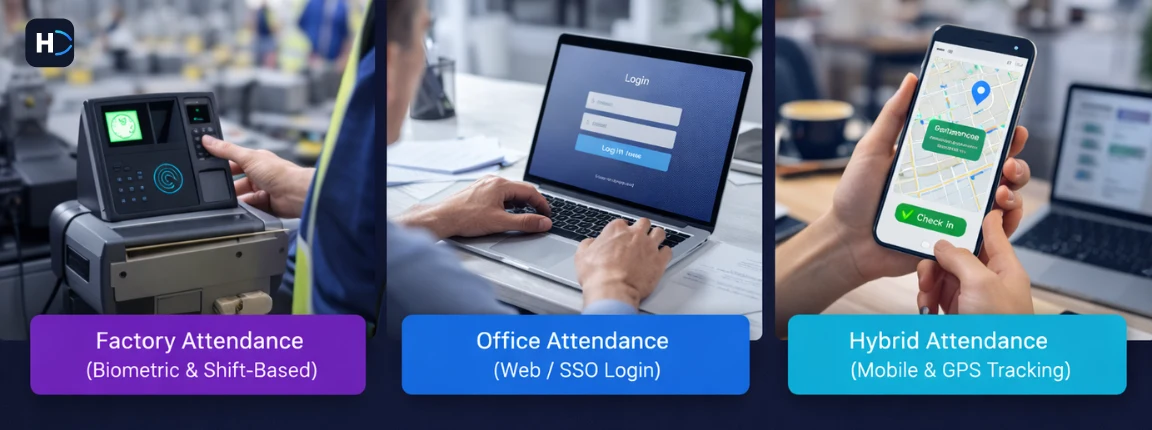
Online attendance systems support multiple check-in methods to accommodate different work models:

  • Mobile app — Employees mark attendance from their smartphones with selfie or location verification.
  • Web login — Employees check in through a browser with IP restrictions to prevent remote misuse.
  • Biometric sync — Attendance data from fingerprint or facial recognition devices flows into the system automatically.
  • GPS-based tracking — Field employees check in from customer sites with GPS coordinates captured.
  • Kiosk or device-based options — Shared tablets or attendance terminals placed at entry points for factory or retail teams.

Most businesses use multiple methods simultaneously. Office teams use biometric or web login. Field teams use mobile app with GPS. And hybrid teams switch between methods based on where they are working.

Attendance Data Capture and Policy Mapping

Once attendance is captured, the system applies attendance policies automatically. Shift rules define which shift an employee belongs to and what their expected work hours are. Grace periods allow employees to check in a few minutes late without being marked late. Late coming rules determine when a late arrival becomes a late mark or a half-day deduction. Half-day rules specify how many hours must be worked to qualify for a full day versus a half day. Overtime rules calculate extra hours worked beyond the shift duration and apply overtime rates. These policies are configured once and applied consistently across all employees.

Approval and Correction Workflow

Employees make mistakes. They forget to check in. They check in from the wrong location. They dispute a late mark. Online attendance systems handle these exceptions through approval workflows. Regularization requests allow employees to apply for attendance corrections when they missed a punch. Manager approval routes these requests to the employee’s supervisor for verification. All of this happens inside the system. No emails. No spreadsheets. And every correction is logged for audit purposes.

Integration with Leave and Payroll

Attendance does not operate in isolation. It affects leave balances, overtime accrual, and payroll calculations. Leave balance sync ensures that when an employee takes leave, their attendance reflects the leave and their balance is updated. Attendance calculation determines how many payable days an employee worked after accounting for leaves, late marks, and absences. Payroll-ready data flows directly into payroll processing without manual intervention. This integration is what makes online attendance systems more powerful than standalone attendance tracking. When attendance, leave, and payroll talk to each other, HR workload decreases and accuracy improves.

Which Businesses Benefit Most from Online Attendance Systems?

Not every business needs online attendance management immediately. But certain business characteristics make the shift from manual to online tracking especially valuable.

Small Businesses Moving Beyond Excel

Small businesses often start with Excel-based attendance tracking because it is simple, free, and familiar. But as the team grows beyond 15 or 20 employees, Excel becomes difficult to manage. Formulas break. Files get shared across multiple versions. Attendance reconciliation takes longer. And the risk of errors increases.

For small businesses in Chennai and Tamil Nadu reaching this stage, online attendance systems offer a clear upgrade path. The system is still simple to use, but it scales better than Excel and integrates with payroll and leave management.

SMEs with Growing Teams

Medium-sized businesses face more complex attendance challenges. More employees means more shifts, more attendance exceptions, more regularization requests, and more payroll dependencies. Manual attendance tracking does not scale well at this level. HR teams spend too much time on routine attendance work. Managers lack real-time visibility. And payroll errors increase because attendance data is not clean.

Online attendance systems help SMEs manage this complexity without adding HR headcount. The system automates routine work, provides real-time visibility, and delivers clean data to payroll.

Multi-Location Businesses

Businesses with branches, offices, site teams, or retail outlets face a specific challenge: how to track attendance across locations without requiring HR presence everywhere. Manual attendance tracking requires each location to maintain its own records and send them to a central HR team for consolidation. This creates delays, inconsistencies, and reconciliation headaches.

Online attendance systems centralize attendance tracking. Employees at every location mark attendance through the same system. HR can see real-time attendance across all locations from a single dashboard. And payroll processing pulls data from all locations automatically. For Chennai and Tamil Nadu businesses with multi-branch operations—retail chains, service centers, manufacturing plants—this centralization is a significant operational improvement.

Field and Remote Workforce Companies

Field employees and remote teams cannot use office-based attendance systems. They need mobile-first attendance tracking with location verification. Online attendance systems support GPS-based check-ins, selfie verification, and geo-fencing to ensure field employees are marking attendance from approved locations. Managers can track field attendance in real time. And payroll processing accounts for field work hours without manual intervention.

For businesses managing sales teams, service engineers, delivery staff, or on-site technicians, mobile attendance tracking is not optional. It is the only practical way to track attendance at scale.

Chennai and Tamil Nadu Businesses with Shift-Based Teams

Shift-based businesses—factories, retail, logistics, security, healthcare—face unique attendance challenges. Multiple shifts mean multiple attendance rules. Shift swaps and roster changes need to be tracked. Overtime calculations vary by shift. And statutory compliance requires accurate shift records.

Manual attendance tracking struggles with this complexity. Online attendance systems handle it automatically. Shift rules are configured once and applied consistently. Roster changes are tracked digitally. And overtime is calculated in real time based on shift duration. For Chennai and Tamil Nadu businesses with shift-based operations, online attendance systems reduce errors, speed up payroll, and improve compliance readiness.

Key Features Businesses Should Look for in an Online Attendance Management System

Not all online attendance systems are the same. Features matter, but the right features depend on your business workflow. Focus on features that solve your specific attendance pain points, not feature count alone.

Real-Time Attendance Dashboard

A real-time attendance dashboard gives HR teams and managers instant visibility into attendance status. Who is present. Who is absent. Who checked in late. Who is on leave. Who has not marked attendance yet. This visibility supports faster decision-making and reduces the need for manual follow-ups.

Mobile and Web Access

Employees should be able to mark attendance from mobile apps or web portals depending on where they are working. Mobile access is essential for field and remote teams. Web access works well for office teams with IP restrictions to prevent misuse.

GPS or Location-Based Tracking

For businesses managing field employees, GPS or location-based tracking ensures employees are marking attendance from approved locations. Geo-fencing creates virtual boundaries—employees can only check in when they are inside the boundary. This prevents attendance fraud and gives managers confidence in the accuracy of field attendance data.

Shift and Roster Management

If your business runs multiple shifts, the attendance system should support shift scheduling, roster planning, and shift swap requests. Employees should be able to see their assigned shifts. Managers should be able to adjust shifts as needed. And attendance policies should apply correctly based on the shift worked.

Leave Integration

Attendance and leave should not run separately. When an employee takes leave, the attendance system should reflect the leave automatically. When calculating payable days, the system should account for both attendance and leave balances. This integration eliminates manual reconciliation and reduces payroll errors.

Overtime Calculation

Overtime calculation should happen automatically based on shift duration, overtime rules, and approval workflows. Manual overtime tracking is error-prone and creates disputes. Automated overtime calculation ensures employees are paid correctly and HR teams do not spend time reconciling overtime claims.

Payroll Integration

Attendance data should flow directly into payroll without manual export or re-entry. This integration speeds up payroll processing, reduces errors, and ensures salary calculations are based on clean attendance data.

Reporting and Analytics

HR teams and managers need access to attendance reports—daily attendance summaries, monthly attendance registers, late-coming reports, absenteeism trends, overtime summaries. The system should generate these reports automatically and allow filtering by team, location, or time period.

Employee Self-Service Access

Employees should be able to see their own attendance data, apply for regularization, check leave balances, and view overtime hours through a self-service portal or mobile app. This transparency reduces disputes and lowers the volume of routine HR queries.

Choose features based on your business workflow. A field sales company needs GPS tracking. A factory needs shift management. A hybrid office needs flexible check-in methods. The right features depend on the attendance challenges you are solving.

How Online Attendance Systems Improve Payroll Accuracy

Payroll accuracy depends on clean attendance data. Manual attendance tracking rarely delivers that. Online attendance systems do.

Attendance Data Flows Directly into Payroll

In an integrated system, attendance data flows directly into payroll processing. No manual export. No re-entry. No reconciliation between attendance records and payroll inputs. This direct flow eliminates a major source of payroll errors. When attendance and payroll are disconnected, errors happen during data transfer. Numbers get transcribed incorrectly. Formulas break. And payroll calculations are based on incomplete or outdated attendance data. Direct integration solves this. Attendance data is payroll-ready from day one.

Fewer Manual Corrections Before Salary Processing

Manual attendance systems require extensive cleanup before payroll processing. HR teams identify discrepancies, reach out for clarifications, correct errors, and manually calculate overtime and deductions. Online attendance systems reduce this cleanup work. Attendance policies are applied automatically. Regularization requests are approved through the system. And attendance data is clean when it reaches payroll. This saves 10 to 15 hours of HR time per payroll cycle. And it reduces the risk of last-minute errors that delay salary processing.

Better Handling of Leave, Late Marks, and Overtime

Leave, late marks, and overtime are the three most common sources of payroll errors in manual systems. Leave deductions are miscalculated because leave balances are tracked separately from attendance. Late marks are missed because they are not flagged consistently. Overtime is disputed because there is no clear record of hours worked. Online attendance systems handle all three automatically. Leave balances sync with attendance. Late marks are flagged based on policy rules. Overtime is calculated in real time based on shift duration and approval workflows. The result is fewer salary disputes and higher employee trust.

Reduced Risk of Salary Disputes

Salary disputes often trace back to attendance data. An employee disputes a salary deduction because they believe they were present when the record shows absent. Or they dispute overtime payment because their claimed hours do not match the payroll calculation. Online attendance systems reduce these disputes by creating a digital audit trail. Every punch is timestamped. Location data is captured. Approval workflows are documented. And employees can see the same attendance data HR sees. When disputes do arise, they are easier to resolve because the evidence is clear.

Which Businesses Benefit Most from Online Attendance Systems?

Not every business needs online attendance management immediately. But certain business characteristics make the shift from manual to online tracking especially valuable.

Small Businesses Moving Beyond Excel

Small businesses often start with Excel-based attendance tracking because it is simple, free, and familiar. But as the team grows beyond 15 or 20 employees, Excel becomes difficult to manage. Formulas break. Files get shared across multiple versions. Attendance reconciliation takes longer. And the risk of errors increases.

For small businesses in Chennai and Tamil Nadu reaching this stage, online attendance systems offer a clear upgrade path. The system is still simple to use, but it scales better than Excel and integrates with payroll and leave management.

SMEs with Growing Teams

Medium-sized businesses face more complex attendance challenges. More employees means more shifts, more attendance exceptions, more regularization requests, and more payroll dependencies. Manual attendance tracking does not scale well at this level. HR teams spend too much time on routine attendance work. Managers lack real-time visibility. And payroll errors increase because attendance data is not clean.

Online attendance systems help SMEs manage this complexity without adding HR headcount. The system automates routine work, provides real-time visibility, and delivers clean data to payroll.

Multi-Location Businesses

Businesses with branches, offices, site teams, or retail outlets face a specific challenge: how to track attendance across locations without requiring HR presence everywhere. Manual attendance tracking requires each location to maintain its own records and send them to a central HR team for consolidation. This creates delays, inconsistencies, and reconciliation headaches.

Online attendance systems centralize attendance tracking. Employees at every location mark attendance through the same system. HR can see real-time attendance across all locations from a single dashboard. And payroll processing pulls data from all locations automatically. For Chennai and Tamil Nadu businesses with multi-branch operations—retail chains, service centers, manufacturing plants—this centralization is a significant operational improvement.

Field and Remote Workforce Companies

Field employees and remote teams cannot use office-based attendance systems. They need mobile-first attendance tracking with location verification. Online attendance systems support GPS-based check-ins, selfie verification, and geo-fencing to ensure field employees are marking attendance from approved locations. Managers can track field attendance in real time. And payroll processing accounts for field work hours without manual intervention.

For businesses managing sales teams, service engineers, delivery staff, or on-site technicians, mobile attendance tracking is not optional. It is the only practical way to track attendance at scale.

Chennai and Tamil Nadu Businesses with Shift-Based Teams

Shift-based businesses—factories, retail, logistics, security, healthcare—face unique attendance challenges. Multiple shifts mean multiple attendance rules. Shift swaps and roster changes need to be tracked. Overtime calculations vary by shift. And statutory compliance requires accurate shift records.

Manual attendance tracking struggles with this complexity. Online attendance systems handle it automatically. Shift rules are configured once and applied consistently. Roster changes are tracked digitally. And overtime is calculated in real time based on shift duration. For Chennai and Tamil Nadu businesses with shift-based operations, online attendance systems reduce errors, speed up payroll, and improve compliance readiness.

Key Features Businesses Should Look for in an Online Attendance Management System

Not all online attendance systems are the same. Features matter, but the right features depend on your business workflow. Focus on features that solve your specific attendance pain points, not feature count alone.

Real-Time Attendance Dashboard

A real-time attendance dashboard gives HR teams and managers instant visibility into attendance status. Who is present. Who is absent. Who checked in late. Who is on leave. Who has not marked attendance yet. This visibility supports faster decision-making and reduces the need for manual follow-ups.

Mobile and Web Access

Employees should be able to mark attendance from mobile apps or web portals depending on where they are working. Mobile access is essential for field and remote teams. Web access works well for office teams with IP restrictions to prevent misuse.

GPS or Location-Based Tracking

For businesses managing field employees, GPS or location-based tracking ensures employees are marking attendance from approved locations. Geo-fencing creates virtual boundaries—employees can only check in when they are inside the boundary. This prevents attendance fraud and gives managers confidence in the accuracy of field attendance data.

Shift and Roster Management

If your business runs multiple shifts, the attendance system should support shift scheduling, roster planning, and shift swap requests. Employees should be able to see their assigned shifts. Managers should be able to adjust shifts as needed. And attendance policies should apply correctly based on the shift worked.

Leave Integration

Attendance and leave should not run separately. When an employee takes leave, the attendance system should reflect the leave automatically. When calculating payable days, the system should account for both attendance and leave balances. This integration eliminates manual reconciliation and reduces payroll errors.

Overtime Calculation

Overtime calculation should happen automatically based on shift duration, overtime rules, and approval workflows. Manual overtime tracking is error-prone and creates disputes. Automated overtime calculation ensures employees are paid correctly and HR teams do not spend time reconciling overtime claims.

Payroll Integration

Attendance data should flow directly into payroll without manual export or re-entry. This integration speeds up payroll processing, reduces errors, and ensures salary calculations are based on clean attendance data.

Reporting and Analytics

HR teams and managers need access to attendance reports—daily attendance summaries, monthly attendance registers, late-coming reports, absenteeism trends, overtime summaries. The system should generate these reports automatically and allow filtering by team, location, or time period.

Employee Self-Service Access

Employees should be able to see their own attendance data, apply for regularization, check leave balances, and view overtime hours through a self-service portal or mobile app. This transparency reduces disputes and lowers the volume of routine HR queries.

Choose features based on your business workflow. A field sales company needs GPS tracking. A factory needs shift management. A hybrid office needs flexible check-in methods. The right features depend on the attendance challenges you are solving.

How Online Attendance Systems Improve Payroll Accuracy

Payroll accuracy depends on clean attendance data. Manual attendance tracking rarely delivers that. Online attendance systems do.

Attendance Data Flows Directly into Payroll

In an integrated system, attendance data flows directly into payroll processing. No manual export. No re-entry. No reconciliation between attendance records and payroll inputs. This direct flow eliminates a major source of payroll errors. When attendance and payroll are disconnected, errors happen during data transfer. Numbers get transcribed incorrectly. Formulas break. And payroll calculations are based on incomplete or outdated attendance data. Direct integration solves this. Attendance data is payroll-ready from day one.

Fewer Manual Corrections Before Salary Processing

Manual attendance systems require extensive cleanup before payroll processing. HR teams identify discrepancies, reach out for clarifications, correct errors, and manually calculate overtime and deductions. Online attendance systems reduce this cleanup work. Attendance policies are applied automatically. Regularization requests are approved through the system. And attendance data is clean when it reaches payroll. This saves 10 to 15 hours of HR time per payroll cycle. And it reduces the risk of last-minute errors that delay salary processing.

Better Handling of Leave, Late Marks, and Overtime

Leave, late marks, and overtime are the three most common sources of payroll errors in manual systems. Leave deductions are miscalculated because leave balances are tracked separately from attendance. Late marks are missed because they are not flagged consistently. Overtime is disputed because there is no clear record of hours worked. Online attendance systems handle all three automatically. Leave balances sync with attendance. Late marks are flagged based on policy rules. Overtime is calculated in real time based on shift duration and approval workflows. The result is fewer salary disputes and higher employee trust.

Reduced Risk of Salary Disputes

Salary disputes often trace back to attendance data. An employee disputes a salary deduction because they believe they were present when the record shows absent. Or they dispute overtime payment because their claimed hours do not match the payroll calculation. Online attendance systems reduce these disputes by creating a digital audit trail. Every punch is timestamped. Location data is captured. Approval workflows are documented. And employees can see the same attendance data HR sees. When disputes do arise, they are easier to resolve because the evidence is clear.

How Online Attendance Systems Improve Employee Experience

Online attendance systems improve employee experience by increasing transparency, reducing disputes, and giving employees more control over their own records.

Employees Can See Their Own Attendance Data

In a manual system, employees cannot see their own attendance records. They do not know if they have been marked late. They do not know their leave balance. They do not know if a missed punch was recorded correctly. This lack of visibility creates frustration. Employees feel like attendance is something that happens to them, not something they control.

Online attendance systems solve this by giving employees access to their own records through a self-service portal or mobile app. They can see their daily attendance, monthly summaries, late marks, leave balances, and overtime hours. And they can spot discrepancies early instead of discovering them at month-end.

Attendance Regularization Becomes Easier

When employees forget to mark attendance or when their attendance is recorded incorrectly, they need a way to request corrections. In a manual system, this requires emailing HR, waiting for a response, and hoping the correction is made before payroll closes. The process is slow, opaque, and frustrating.

In an online system, employees apply for regularization through the same platform they use to check attendance. They submit the request. The system routes it to their manager. The manager approves or rejects. And the employee sees the status update in real time. This transparency speeds up approvals and reduces back-and-forth between employees and HR.

Transparency Builds Trust

Attendance transparency builds employee trust because employees can verify their own records instead of relying entirely on HR. When employees see that the system is consistent, fair, and accurate, they trust it more. When they can apply for corrections and see the approval process, they feel heard. And when they can access their attendance data anytime, they feel more in control. This trust reduces disputes, lowers HR workload, and improves overall employee satisfaction.

Online Attendance Systems for Chennai and Tamil Nadu Businesses

Chennai and Tamil Nadu businesses face specific operational challenges that make online attendance systems especially valuable.

Why Local Businesses Need More Than Basic Attendance Tracking

Tamil Nadu businesses operate in a competitive, fast-paced market where operational efficiency matters. Payroll dependency is high—employees expect salaries on time, and delays damage trust. Shift complexity is common in manufacturing, retail, logistics, and services. Multi-branch operations require centralized tracking across locations. And workforce growth creates attendance complexity that manual systems cannot handle.

For businesses in Chennai managing office teams, field sales, factory shifts, or retail outlets, basic attendance tracking is not enough. The system needs to support multiple work models, integrate with payroll, and scale as the business grows.

Importance of Tamil Nadu-Friendly HR and Payroll Integration

Attendance is not isolated. It affects payroll, leave, and compliance readiness. For Tamil Nadu businesses, this integration is especially important because payroll processing happens monthly and any attendance error delays salary disbursement. When attendance integrates with payroll, salary calculations are based on clean data. When attendance integrates with leave, leave balances are accurate. And when attendance integrates with compliance systems, statutory reports are ready when needed.

Tamil Nadu-friendly HR software should support local compliance requirements, handle multi-shift operations, and integrate attendance with payroll seamlessly. Standalone attendance systems that do not connect to payroll create more work, not less.

Why Chennai Businesses Prefer Cloud-Based Attendance Tools

Cloud-based attendance tools offer easier access, centralized tracking, and better fit for growing teams. Easier access means employees can mark attendance from anywhere—office, home, field, or branch. Centralized tracking means HR can see attendance across all locations from a single dashboard. And better fit for growing teams means the system scales without requiring new infrastructure or additional headcount.

For Chennai businesses with distributed teams or multi-location operations, cloud-based attendance is the practical choice. It works on day one, scales as the business grows, and integrates with existing payroll and leave systems.

Signs Your Business Has Outgrown Manual Attendance Tracking

Manual attendance tracking works until it stops working. The question is not whether you will outgrow it. The question is whether you recognize the signs early enough to avoid operational problems.

Here are the clearest signs your business has outgrown manual attendance tracking:

  • Attendance corrections happen every month — If HR spends time every month fixing attendance errors, the system is not working.
  • Payroll is delayed because attendance is not ready — If attendance reconciliation pushes payroll deadlines, the bottleneck is clear.
  • Managers keep asking HR for attendance status — If managers do not have real-time visibility, they lack the data they need to manage teams effectively.
  • Remote employees are hard to track — If field or remote attendance relies on manual check-ins or emails, accuracy suffers.
  • Excel files are becoming difficult to manage — If attendance spreadsheets are getting larger, more complex, or breaking more often, scalability is the issue.
  • Employees question attendance entries often — If disputes are frequent, transparency is missing.
  • HR spends more time on attendance than on strategic work — If attendance administration consumes most of HR’s time, opportunity cost is high.

If three or more of these signs apply to your business, manual attendance tracking is creating more friction than control. An online attendance system will reduce errors, speed up payroll, and free up HR time for work that moves the business forward.

How to Shift from Manual to Online Attendance System

Shifting from manual to online attendance does not require a complete HR overhaul. It requires a clear process, thoughtful configuration, and employee buy-in.

Review Your Current Attendance Process

Start by mapping your current attendance workflow. How do employees mark attendance? How does attendance data move from collection to payroll? Where do errors happen? Where do delays occur? What takes the most HR time? This review identifies pain points and helps you prioritize features when evaluating online attendance systems.

Identify Policy Rules and Attendance Pain Points

Document your attendance policies. Grace periods. Late-coming rules. Half-day thresholds. Shift schedules. Overtime calculation. Weekly off rules. Leave integration. Online attendance systems automate these policies, but only if they are configured correctly. Also identify specific pain points: buddy punching, missed punches, shift swap tracking, field attendance verification, or multi-location consolidation. Whatever is causing the most problems in your current system should be the first thing your new system solves.

Choose the Right Attendance System

Evaluate attendance systems based on your specific requirements. Do you need mobile attendance? GPS tracking? Biometric integration? Shift management? Payroll integration? Multi-location support? Look for systems that solve your pain points, not systems with the most features. A simple system that integrates well with your payroll software is better than a complex system that requires manual data export. For Chennai and Tamil Nadu businesses, choose systems that understand local payroll workflows, support shift-based operations, and offer strong customer support.

Configure Shifts, Rules, and Workflows

Once you choose a system, configure attendance policies to match your business rules. Set up shifts. Define grace periods. Configure late-coming and overtime rules. Map approval workflows. Test regularization requests. This configuration step is critical. If policies are configured incorrectly, the system will produce inaccurate data. Most attendance software providers offer onboarding support to help with configuration. Use it.

Train Employees and Managers

Employees need to know how to mark attendance, apply for regularization, and access their attendance records. Managers need to know how to approve requests, track team attendance, and generate reports. Training does not need to be extensive. A 30-minute walkthrough is usually enough. But it needs to happen. If employees do not know how to use the system, adoption will be slow and manual workarounds will persist.

Connect Attendance with Payroll and Leave

The final step is integration. Connect the attendance system with payroll so attendance data flows automatically. Connect it with leave management so leave balances sync correctly. And configure reporting so HR teams can access the attendance data they need for compliance and decision-making. When attendance, leave, and payroll are integrated, the system delivers maximum value. Manual reconciliation disappears. Payroll processing speeds up. And HR workload decreases.

How HR Software Makes Attendance Management Easier

Attendance works better when it is part of an integrated HR system, not a standalone tool.

Attendance Works Better When Connected with Payroll

Attendance and payroll depend on each other. Payroll needs accurate attendance data. Attendance affects salary calculations. And when the two systems are disconnected, reconciliation creates work and errors. Integrated HR software eliminates this reconciliation. Attendance data flows directly into payroll. Salary calculations are based on clean data. And payroll processing happens faster.

Leave and Attendance Should Not Run Separately

Leave affects attendance. Attendance affects leave balances. When leave and attendance run separately, both systems become less accurate. Integrated HR software synchronizes leave and attendance automatically. When an employee takes leave, the attendance system reflects it. When calculating payable days, the system accounts for both attendance and leave. And employees see both their attendance records and leave balances in the same place.

One System Reduces HR Manual Work

Every disconnected system adds manual work. Data needs to be exported from one system and imported into another. Reports need to be generated separately and consolidated manually. One integrated system reduces this manual work. Attendance, leave, and payroll share the same data. Reports pull from a single source. And HR teams spend less time managing systems and more time managing people.

Better Reports, Better Decisions

Integrated HR software provides better reporting because all HR data sits in one place. You can generate reports that combine attendance, leave, payroll, and performance data. You can identify trends across teams, locations, or time periods. And you can make data-backed decisions about workforce management. For Chennai and Tamil Nadu businesses managing growing teams, integrated HR software is a practical way to manage complexity without adding headcount.

Final Thoughts

Businesses are moving from manual to online attendance systems because manual tracking creates operational friction that grows with the business. What works for a small team becomes a bottleneck for a growing team. What seems like a minor inconvenience each month becomes a major cost when payroll delays, attendance disputes, and HR workload compound over time.

Online attendance systems solve these problems by automating attendance capture, applying policies consistently, providing real-time visibility, and integrating with payroll and leave management. The shift is not about technology for its own sake. It is about accuracy, speed, control, and employee transparency.

For Chennai and Tamil Nadu businesses managing office teams, field employees, shift workers, or multi-location operations, the question is not whether to move to online attendance tracking. The question is when. And the answer is usually earlier than most businesses think.

If manual attendance is creating delays, errors, or visibility problems, online attendance management is the practical next step. It reduces HR workload. It improves payroll accuracy. It gives employees transparency. And it scales as your business grows.

See how online attendance works for growing businesses — Book a free walkthrough of an integrated attendance and payroll system built for Chennai and Tamil Nadu teams.

Frequently Asked Questions

What is an online attendance management system?

An online attendance management system is a cloud or on-premise software that records employee clock-in and clock-out times, tracks work hours, shifts, overtime and breaks, and syncs the data automatically to payroll and leave modules. Unlike manual attendance tracking that relies on registers or spreadsheets, online systems capture attendance digitally through mobile apps, biometric devices, web portals, or GPS-based check-ins.

Why are businesses moving from manual attendance to online systems?

Businesses are moving from manual to online attendance systems because manual tracking creates errors, delays, and poor visibility as teams grow. Manual systems require extensive data entry, reconciliation, and correction work. They do not scale well. They struggle with remote and field teams. And they create payroll delays when attendance data is not ready on time. Online systems automate attendance capture, apply policies consistently, and integrate with payroll to eliminate these problems.

How does an online attendance system work?

An online attendance system captures employee check-ins through mobile apps, web portals, biometric devices, or GPS-based tracking. It applies attendance policies automatically—grace periods, late marks, half-day rules, overtime thresholds. Employees can apply for regularization when they miss a punch. Managers approve requests through the system. And attendance data flows directly into payroll and leave management without manual intervention.

Is online attendance better than Excel tracking?

Yes, online attendance systems are better than Excel for most businesses once the team grows beyond 15 to 20 employees. Excel requires manual data entry, does not enforce policies automatically, does not provide real-time visibility, and does not integrate with payroll. Online systems automate data capture, apply policies consistently, give managers real-time visibility, and sync attendance with payroll and leave management. This reduces errors, speeds up payroll, and lowers HR workload.

Can an online attendance system integrate with payroll?

Yes, most online attendance systems integrate with payroll software. When attendance and payroll are integrated, attendance data flows directly into payroll processing without manual export or re-entry. This integration eliminates payroll errors caused by attendance data mismatches, speeds up salary processing, and ensures employees are paid correctly based on days worked, leaves taken, and overtime hours.

Is online attendance useful for small businesses?

Yes, online attendance is useful for small businesses that are outgrowing manual tracking methods. Small businesses benefit from reduced HR workload, fewer payroll errors, and better employee transparency. Even basic online attendance with mobile check-ins and payroll integration delivers significant value compared to Excel or registers.

Can remote employees be tracked through online attendance software?

Yes, online attendance systems support remote employee tracking through mobile apps with GPS or location verification. Employees can mark attendance from their smartphones. The system captures location data to verify they are working from approved locations. And managers can track remote attendance in real time through a dashboard. This makes online attendance especially valuable for businesses managing field teams, sales staff, or distributed workforces.

Online Attendance Management System: Complete Guide 2026

An online attendance management system is a cloud or web-based platform that records employee attendance in real time through browsers, mobile apps, or GPS check-ins u2014 without requiring biometric hardware or manual registers.
Biometric systems require dedicated hardware installed at a fixed location. Online attendance systems work through internet-connected devices like smartphones and laptops, making them suitable for remote, hybrid, and multi-location teams without hardware costs.
Yes. Most systems use selfie-based verification, GPS location tagging, IP address restrictions, or a combination of these to prevent employees from marking attendance on behalf of others.
Yes. Most modern online attendance systems integrate with payroll platforms either natively (as part of an HRMS suite) or through API, eliminating manual data transfer.
Yes. GPS-enabled mobile check-in records the exact location and timestamp when the employee checks in or out, giving HR accurate records even when staff are not in the office.
Most cloud-based systems in India are priced at u20b930 to u20b9150 per employee per month depending on features and the vendor.
A basic implementation for up to 200 employees can be completed in 1u20132 weeks. Full rollout with training typically takes 3u20134 weeks.
Yes. Most platforms support multiple shift definitions, rotating rosters, weekly-off configurations, and holiday calendars applied automatically.

Stay Updated

HR & Payroll Insights for Chennai Businesses

Get practical tips on payroll compliance, attendance automation, and HR best practices — straight to your inbox.

No spam. Unsubscribe anytime.