
A biometric terminal that went offline overnight. A remote employee who forgot to log in to the attendance portal. A factory supervisor who marked an entire shift as present because chasing individual punches takes too long. These are not edge cases. They are the daily reality of workforce attendance management across mixed work environments.
The consequences compound quickly. Incorrect attendance feeds wrong LOP calculations, which corrupt payroll, which generate employee disputes, which consume HR time that should be spent elsewhere. Beneath all of that sits a compliance risk many teams only discover during inspection.
Attendance software for a factory floor looks nothing like attendance software for a hybrid IT team. Understanding the clock-in methods, compliance obligations, scheduling complexity, and integration needs of each environment is the starting point for choosing a solution that actually works.
Why One-Size Attendance Tracking Fails
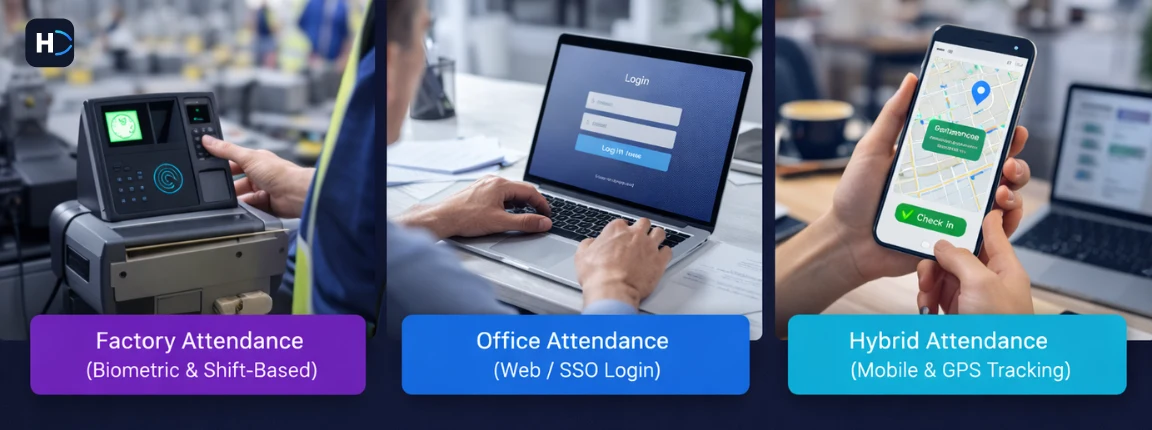
The most common mistake organizations make when evaluating attendance software is treating it as a generic problem with a generic solution. It is not. The three environments have fundamentally different requirements:
- Factory and manufacturing: Large hourly workforces, shift-based scheduling, biometric hardware dependency, strict statutory compliance under the Factories Act, and low tolerance for buddy punching or time theft.
- Office and corporate: Predominantly salaried staff, flexible or hybrid schedules, emphasis on project time allocation and leave integration, lower fraud risk but higher complexity around policy enforcement.
- Hybrid teams: Employees move between home, office, and client sites. Presence in office and attendance are not the same thing. Policy compliance requires location-aware tracking that basic systems cannot handle well.
Selecting a platform without understanding these distinctions leads to either over-engineering a simple problem or under-equipping a complex one. Both cost money and credibility.
The 7 Attendance Checks Every HR Team Should Automate
1. Clock-In Data Consolidation Across Sources
What goes wrong manually: In mixed workforce organizations, attendance data comes from too many places. Factory biometric logs, office web portals, WhatsApp location shares, and self-declared spreadsheets all need to be reconciled before payroll can begin.
What attendance software does: It integrates all clock-in methods into a single attendance dashboard. Data flows in automatically. Conflicts and exceptions surface as alerts. Payroll cannot proceed until the record is complete.
- Factory: Fixed biometric terminals validate shift assignment against clock-in time.
- Office: Web or SSO login links browser clock-in to corporate identity.
- Hybrid: Mobile app with geofencing tags each clock-in as on-site or remote.
Time saved: 4 to 6 hours per payroll cycle for a 100-person mixed workforce.
2. Shift Scheduling and Roster Management
What goes wrong manually: Shift scheduling in a factory running three rotations is a logistical puzzle. Supervisors build rosters in Excel, email them to HR, and then modify them when someone calls in sick or swaps shifts. By payroll time, the planned roster and the worked roster are often different documents.
What attendance software does: It builds and publishes rosters directly in the platform. Shift swaps are requested and approved inside the system, creating an audit trail. The final worked schedule is the one used for attendance calculation.
- Factory: Multi-shift rotation scheduling with overtime and rest period rules enforced automatically.
- Office: Flexible or core-hours scheduling with policy exceptions flagged.
- Hybrid: In-office day scheduling and minimum on-site requirement tracking.
Key rule: Under the Tamil Nadu Factories Act, no worker should work more than 48 hours a week or 9 hours a day without overtime compensation. Attendance software helps enforce these thresholds.
3. Real-Time Attendance Visibility and Exception Management
What goes wrong manually: Supervisors often do not know in real time who is present, absent without notice, or late until after the shift has already moved on. Chronic absenteeism patterns go unnoticed until they create output or morale issues.
What attendance software does: It provides live attendance dashboards that update the moment an employee clocks in or out. Absences, late arrivals, early departures, and unplanned overtime surface as real-time exceptions.
- Factory: Zone-level headcount dashboards by department.
- Office: Team presence view for on-site, remote, and absent employees.
- Hybrid: Location-aware status board covering on-site, remote, on-leave, and absent states.
4. Leave Integration and LOP Calculation
What goes wrong manually: Attendance and leave are often tracked in separate systems. HR must manually reconcile approved leave with absences before calculating Loss of Pay. If the reconciliation is wrong, either the employee is underpaid or the company absorbs a leave day that was never approved.
What attendance software does: It integrates leave management directly into the attendance engine. Approved leave updates the attendance record. Unapproved absences are flagged as potential LOP. Payroll reads a single reconciled figure.
| Absence Type | Manual Risk | Automated Handling |
|---|---|---|
| Planned leave | Not reflected in attendance system | Auto-updated with no LOP |
| Unplanned absence | Ignored or manually adjusted | Flagged immediately with LOP logic |
| Half-day absence | Frequently miscalculated | Precise half-day LOP applied |
| Public holiday absence | Wrongly counted as LOP | Holiday master excludes Tamil Nadu holidays |
| Remote day | Marked absent or assumed present | Location tag applied and classified correctly |
5. Overtime Tracking and Compliance
What goes wrong manually: Overtime often gets approved verbally and entered from memory later. That leads to a mix of underpayment, which creates legal risk, and overpayment, which inflates labour cost silently.
What attendance software does: It calculates overtime automatically from actual clock-in and clock-out data. Approval workflows allow supervisors to authorize overtime in advance, creating a clean record that feeds payroll directly.
- Factory: Overtime calculated at twice the ordinary wage rate with weekly threshold alerts.
- Office: Comp-off tracked for salaried staff working weekends or holidays.
- Hybrid: Field or remote overtime tracked from verified clock-out data.
Compliance note: Under the Tamil Nadu Factories Act, quarterly overtime limits matter. Attendance software helps track cumulative overtime and alert HR before thresholds are crossed.
6. Biometric and Hardware Integration
What goes wrong manually: Many organizations have biometric hardware connected to legacy software that cannot export usable data, flag missed punches, or integrate with payroll. The result is a system that records attendance but does not truly process it.
What attendance software does: It integrates natively with major biometric hardware brands used across Chennai. Punch data flows directly into the attendance engine without manual export or reformatting.
- ZKTeco for manufacturing and BPO campuses
- Mantra for healthcare and government-adjacent organizations
- Suprema for IT parks and corporate offices
- Matrix and eSSL for SMEs and industrial units
For hybrid and remote teams, mobile attendance apps with GPS geofencing can replace dedicated hardware entirely.
7. Compliance Reporting and Audit Readiness
What goes wrong manually: During a Labour Department or Shops and Establishments inspection, employers may be required to produce muster rolls, wage registers, and overtime registers quickly. Teams relying on manual systems often take days to compile these records and may still produce them in the wrong format.
What attendance software does: It maintains a continuously updated, audit-ready record of every employee’s attendance, shifts, overtime, and leave. Statutory reports can be generated from live data in the required format.
| Report | Applicable Law | Frequency |
|---|---|---|
| Muster Roll | Tamil Nadu Factories Act | Monthly |
| Overtime Register | Tamil Nadu Factories Act | Monthly |
| Wage Register | Tamil Nadu Shops Act / Factories Act | Monthly |
| Leave Register | Tamil Nadu Shops Act | Annual or on demand |
| Annual Return | Tamil Nadu Factories Act | Annual |
| Attendance Register | Tamil Nadu Shops Act | Ongoing |
Putting It All Together: The Automated Attendance Workflow
When all seven checks are automated, the daily and monthly attendance process becomes a structured, exception-driven workflow rather than a reactive scramble:
- Employees clock in across biometric, mobile, and web channels and data consolidates in real time.
- Shift schedules are compared against actual punches and mismatches are flagged immediately.
- Absences trigger alerts to supervisors and no-shows are known within minutes.
- Leave approvals sync automatically so there is no manual reconciliation with attendance.
- Overtime accumulates in real time and threshold alerts fire before compliance limits are breached.
- Month-end attendance locks only after all exceptions are resolved before payroll begins.
- Statutory reports are generated on demand in audit-ready formats.
Total active HR time for attendance processing on a 200-person mixed workforce can fall to under two hours per month, down from two to three days.
Environment-by-Environment Summary
| Capability | Factory / Manufacturing | Office / Corporate | Hybrid Teams |
|---|---|---|---|
| Primary clock-in method | Biometric terminal | Web / SSO / badge | Mobile app with geofencing |
| Shift scheduling | Multi-shift rotation | Flexible / core hours | In-office day scheduling |
| Overtime tracking | Factories Act, 2x rate | Comp-off for salaried staff | GPS-verified for field staff |
| Key compliance | Factories Act, muster and overtime records | Shops Act, wage register | Shops Act plus hybrid policy |
| Leave integration | LOP auto-triggered | Flexible leave types | Remote day distinction |
| Real-time visibility | Zone-level headcount | Team presence board | Location-aware status |
| Hardware required | Yes, biometric terminals | Optional | No, mobile-first |
| Buddy punch prevention | Biometric or facial recognition | Low risk | Geofence and verification controls |
Conclusion
Attendance management is not a background administrative task. It is the data foundation on which payroll accuracy, statutory compliance, and workforce planning all depend. Get it wrong, and the errors propagate silently through downstream processes until they surface as payroll disputes, compliance penalties, or employee attrition driven by salary mistakes.
The right attendance software does not just record when people arrive and leave. It consolidates data from every source, enforces the rules specific to each workforce type, integrates leave and overtime into one record, and keeps the organization audit-ready at all times without requiring HR to manage it manually.
For Chennai organizations running factory floors, office teams, and hybrid arrangements simultaneously, a platform that handles all three environments within one system is not a convenience. It is the only way to maintain consistent visibility and compliance across a workforce that no longer fits neatly into a single model.
Takeaway: Choose attendance software built for your workforce mix, not the average of all workforces. A platform that supports factory, office, and hybrid requirements eliminates one of the largest sources of payroll error and compliance risk in Chennai organizations.